---
title: 🔗¿Cómo comprar la licencia Beeverso 2026 con Yape?
description: Te brindamos el paso a paso para comprar la licencia BeeReaders con Yape.
---
[Ir directamente al contenido](https://soporte.beeverso.org/preguntasfrecuentes/como-comprar-beereaders-con-yape-peru#main-content)
Español
Traducciones de Mostrar submenú de

- [About Beeverso](https://www.beeverso.org/students)
Abrir navegación principal
Cerrar navegación principal
- [About Beeverso](https://www.beeverso.org/students)
- Español
Traducciones de Mostrar submenú de
¡Bienvenidos a nuestro Centro de Ayuda Beeverso!
- No hay sugerencias porque el campo de búsqueda está vacío.
1. [Preguntas frecuentes](https://soporte.beeverso.org/preguntasfrecuentes?hsLang=es)
2. [Adquirir licencia](https://soporte.beeverso.org/preguntasfrecuentes/adquirir-licencia?hsLang=es)
3. [Perú](https://soporte.beeverso.org/preguntasfrecuentes/adquirir-licencia?hsLang=es#per%C3%BA)
# 🔗¿Cómo comprar la licencia Beeverso 2026 con Yape?
## Te brindamos el paso a paso para comprar la licencia Beeverso con Yape.
Para iniciar el proceso, por favor ten a la mano el **DNI del estudiante y ve el siguiente video:**
Presta atención a los siguientes pasos **si deseas comprar desde tu celular**.
#### **Paso 1**
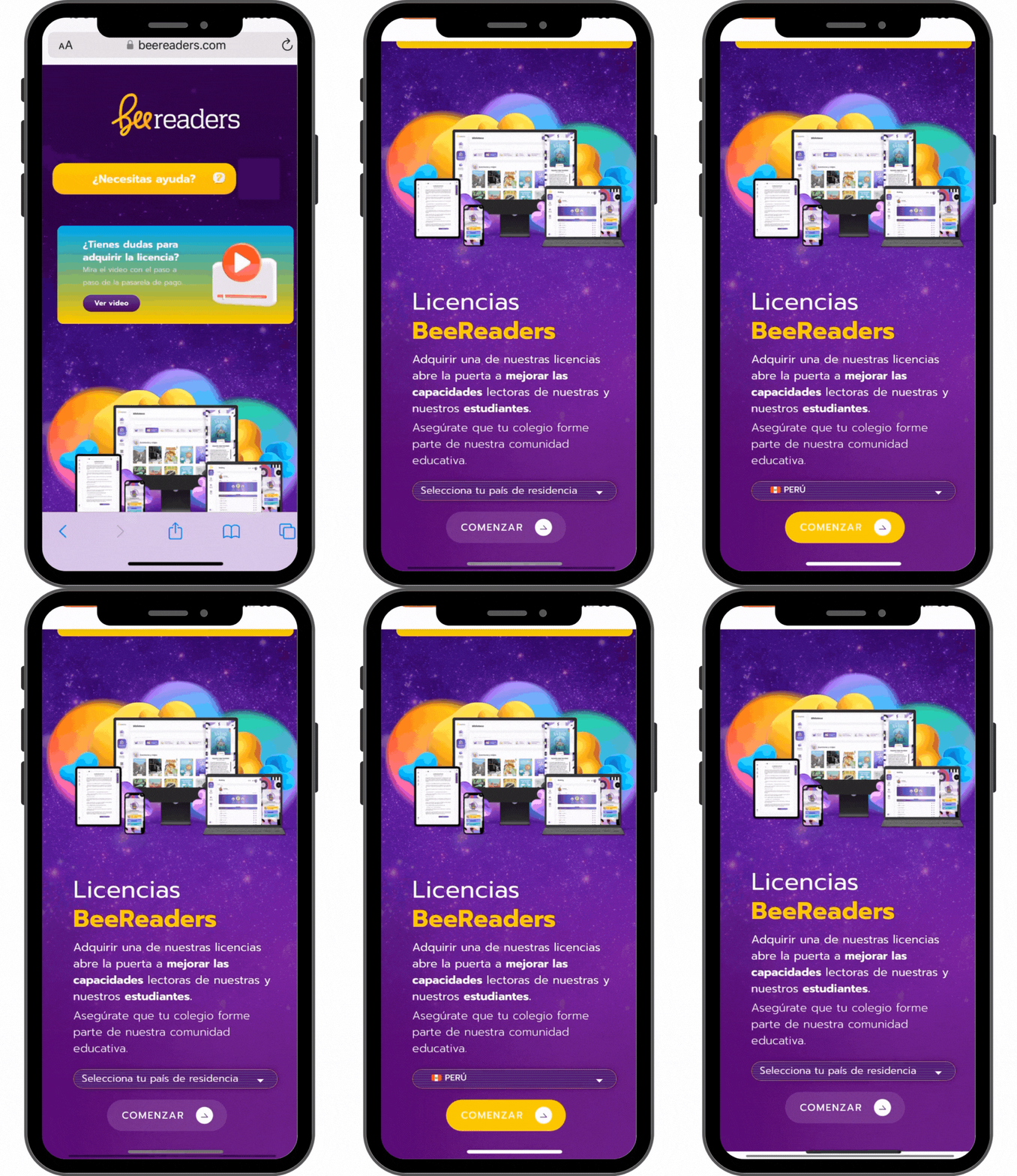
Ingresa a la página web: [www.beeverso.org](https://www.beeverso.org/). Luego, selecciona la **opción "Licencias".**
.gif?width=288&height=499&name=como%20comprar%20licencia%20%20(1).gif)
Luego, selecciona como **país de residencia Perú** y haz clic en **Comenzar***.*
**
#### **Paso 2**
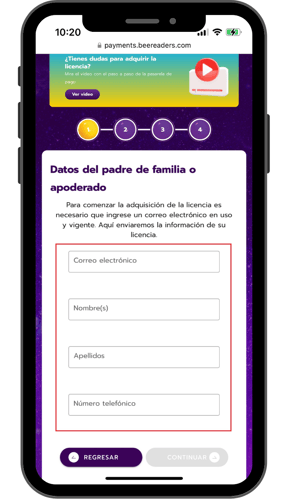
Completa los **datos del padre de familia** o **apoderado.**
#### **Paso 3**
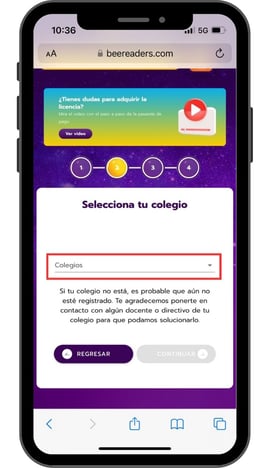
**Seleccione el colegio** correspondiente en la lista desplegable.
#### **Paso 4**
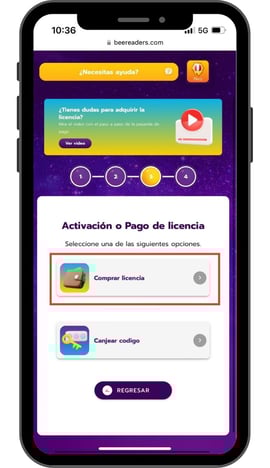
Verás 2 opciones. Selecciona **Comprar licencia**.
****
#### **Paso 5**
Completa los **datos del estudiante**.
.gif?width=270&height=468&name=VIDEO%20%20(8).gif)
#### **Paso 6**
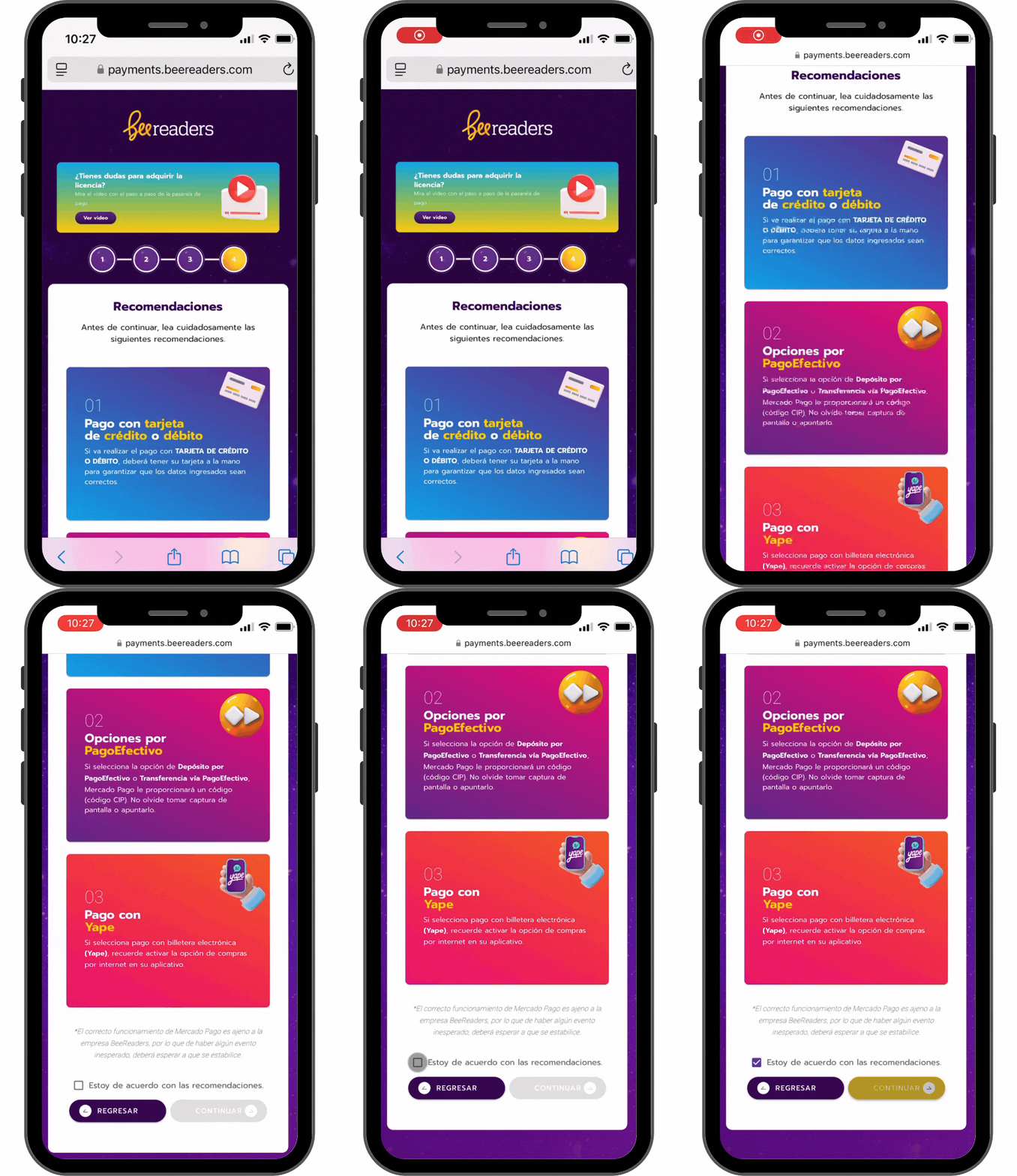
Lee detenidamente las **recomendaciones** y presiona **Continuar***.*
**
#### **Paso 7**
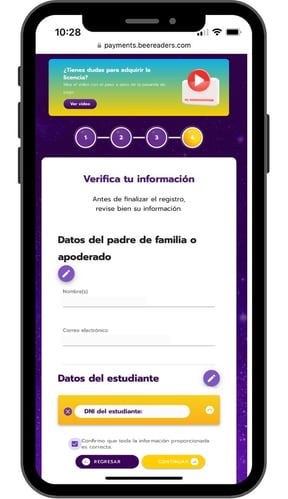
**Verifica** que la **información ingresada** se registró adecuadamente. Luego, presiona **Continuar**.
#### **Paso 8**
Serás redirigido al portal de **Mercado** **Pago**, donde debes elegir la opción **Yape.**
.png?width=270&height=468&name=Yape%20fotos%20(1).png)
#### **Paso 9**
Ingresa tu **número de teléfono registrado en Yape** y tu **código de aprobación**.
**.png?width=288&height=499&name=Yape%20fotos%20(3).png)**
Para obtener el código de aprobación, **ingresa a tu aplicativo Yape** y haz clic en la opción **Aprobar compras**.
.png?width=288&height=499&name=Yape%20fotos%20(1).png)
.png?width=288&height=499&name=Yape%20fotos%20(2).png)
Debes tener activada la opción **Compras por internet** en tu aplicativo Yape para generar los códigos.
#### **Paso 10**
Completados los datos del paso 9, procede a pagar. Verás un mensaje de pago acreditado.
.png?width=270&height=468&name=Yape%20fotos%20(1).png)
#### **Paso 11**
Finalmente, recibirás un **correo electrónico con las instrucciones de acceso**. El asunto del correo será: *Bienvenido a BeeReaders 2026: Instrucciones para iniciar sesión*.Sugerimos que revises tu bandeja de spam o no deseados.
.jpg?width=270&height=468&name=VIDEO%20%20(1).jpg)
Para consultas y ayuda durante el proceso de compra, dirígete a nuestro 👉 **[Formulario de ayuda](https://soporte.beereaders.com/ayuda)**.
- [Adquirir licencia](https://soporte.beeverso.org/preguntasfrecuentes/adquirir-licencia?hsLang=es#main-content)
- [Perú](https://soporte.beeverso.org/preguntasfrecuentes/adquirir-licencia?hsLang=es#per%C3%BA)
- [Colombia](https://soporte.beeverso.org/preguntasfrecuentes/adquirir-licencia?hsLang=es#colombia)
- [Estudiantes](https://soporte.beeverso.org/preguntasfrecuentes/estudiantes?hsLang=es)
- [Educadores](https://soporte.beeverso.org/preguntasfrecuentes/educadores?hsLang=es#main-content)
- [Módulo fluidez lectora](https://soporte.beeverso.org/preguntasfrecuentes/educadores?hsLang=es#m%C3%B3dulo-fluidez-lectora)
- [Módulo evaluaciones](https://soporte.beeverso.org/preguntasfrecuentes/educadores?hsLang=es#m%C3%B3dulo-evaluaciones)
- [Módulo reportes](https://soporte.beeverso.org/preguntasfrecuentes/educadores?hsLang=es#m%C3%B3dulo-reportes)
- [Glosario del módulo reportes](https://soporte.beeverso.org/preguntasfrecuentes/educadores?hsLang=es#glosario-del-m%C3%B3dulo-reportes)
- [Padres de Familia](https://soporte.beeverso.org/preguntasfrecuentes/padres-de-familia?hsLang=es#main-content)
- [App de Familia](https://soporte.beeverso.org/preguntasfrecuentes/padres-de-familia?hsLang=es#app-de-familia)
- [About Beeverso](https://www.beeverso.org/students)
[](https://www.beeverso.org)
Centro de ayuda Beeverso
Copyright © 2026, Beeverso